
Table of Contents
I love to travel. I even love all the work that goes into getting there. That's the kind of work I like to do when I'm procrastinating from doing my real work.
Technology has made planning a trip considerably easier. I can compare hundreds of flights in seconds, wander virtually around the neighborhood where I'm thinking of staying, translate a menu by pointing my phone at it, and ask AI to build me a packing list.
I should say up front: I see real value in a good travel agent. Years ago, when I booked travel for my employer, I worked with one regularly, and having a person who knew the industry, could untangle a mess when something went wrong, and had relationships airlines and hotels don't extend to the rest of us was genuinely worth it. But this column isn't for those travelers. It's for the ones who'd always prefer to "do it themselves". For them, the trick is knowing which technology to trust with which job.
Let Google do the hunting
My favorite place to start looking for airfare is Google Flights. It's comprehensive but not exhaustive. If you fly a budget or regional carrier, check their site directly too. I use Google Flights to find the flight, but whenever possible, I book the actual ticket directly with the airline.
If your dates are flexible, don't just search once and accept the price you see. Click the dates in Google Flights and look at the pop-up calendar. Google displays prices right on the calendar, making it easy to see whether leaving a day earlier or later could save you money. Sometimes shifting your trip by just a day can make a surprisingly big difference.
Flexible on airports? Try those too. If you live within driving distance of more than one, search them together, and do the same for your destination. Sometimes flying into a nearby airport and driving the last hour saves enough to be worth it.
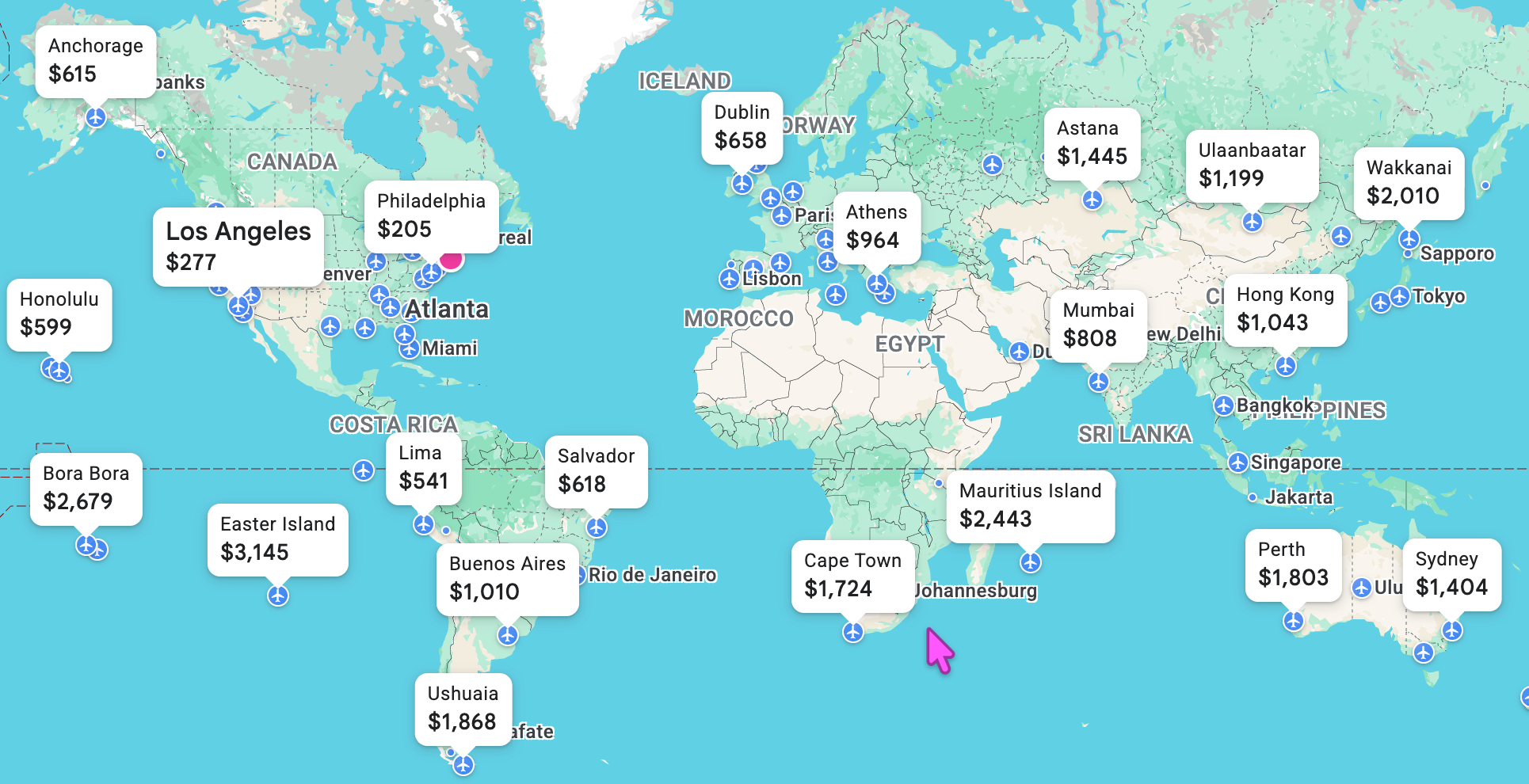
If you're flexible on the destination itself, Google Flights gets even more fun. Use the "Anywhere" destination to browse a map showing airfare to destinations all over the place. Instead of asking, "How much will it cost to go to Florida?" you can ask, "Where can I go somewhere warm for $400?"
Google Flights will also tell you whether a fare is low, typical or high compared with historical prices, and for some itineraries, when fares have historically been cheapest to book. Not ready to commit? Turn on price tracking so Google notifies you when the price changes.

One caution: don't automatically choose the cheapest result. Google Flights now shows both "Best" and "Cheapest" options. The latter can uncover bargains, but sometimes they're cheap for a reason: an awkward connection, a self-transfer between flights, different airports or a third-party booking site. I would much rather pay $20 more for a straightforward ticket booked directly with the airline than save $20 and discover what "self-transfer" means while sprinting through an unfamiliar airport.
Search widely / Book directly
I use the same philosophy for hotels and rental cars. There's nothing wrong with using a travel site like Expedia to compare prices, but before booking, I check the hotel's, airline's or rental company's own website too. Sometimes it's the same price. Sometimes it's better. And booking directly comes with advantages that aren't obvious until something goes wrong: if your flight is canceled or your room isn't what you expected, I'd rather be the airline's or hotel's customer than the customer of a third-party company sitting between us.
Give AI the tedious jobs
This is where AI tools like ChatGPT and Claude can be incredibly useful. As long as you give them a specific problem instead of asking them to simply "plan my vacation."
Tell it: "I'm going to London for five days in October. I'm staying near Paddington Station. I like museums and history, don't want to spend more than $75 a day on attractions and food, and don't want an itinerary that has me crisscrossing the city all day."
That's much more useful. AI can group attractions geographically, suggest a realistic itinerary, build a packing list, explain local transportation, compare two destinations, or turn a pile of reservation information into a simple day-by-day plan. I also like it for the little questions that used to require ten Google searches: What's the easiest way from the airport to my hotel? Is tipping customary? Will I need cash? What adapter do I need?
Take a virtual walk before you book
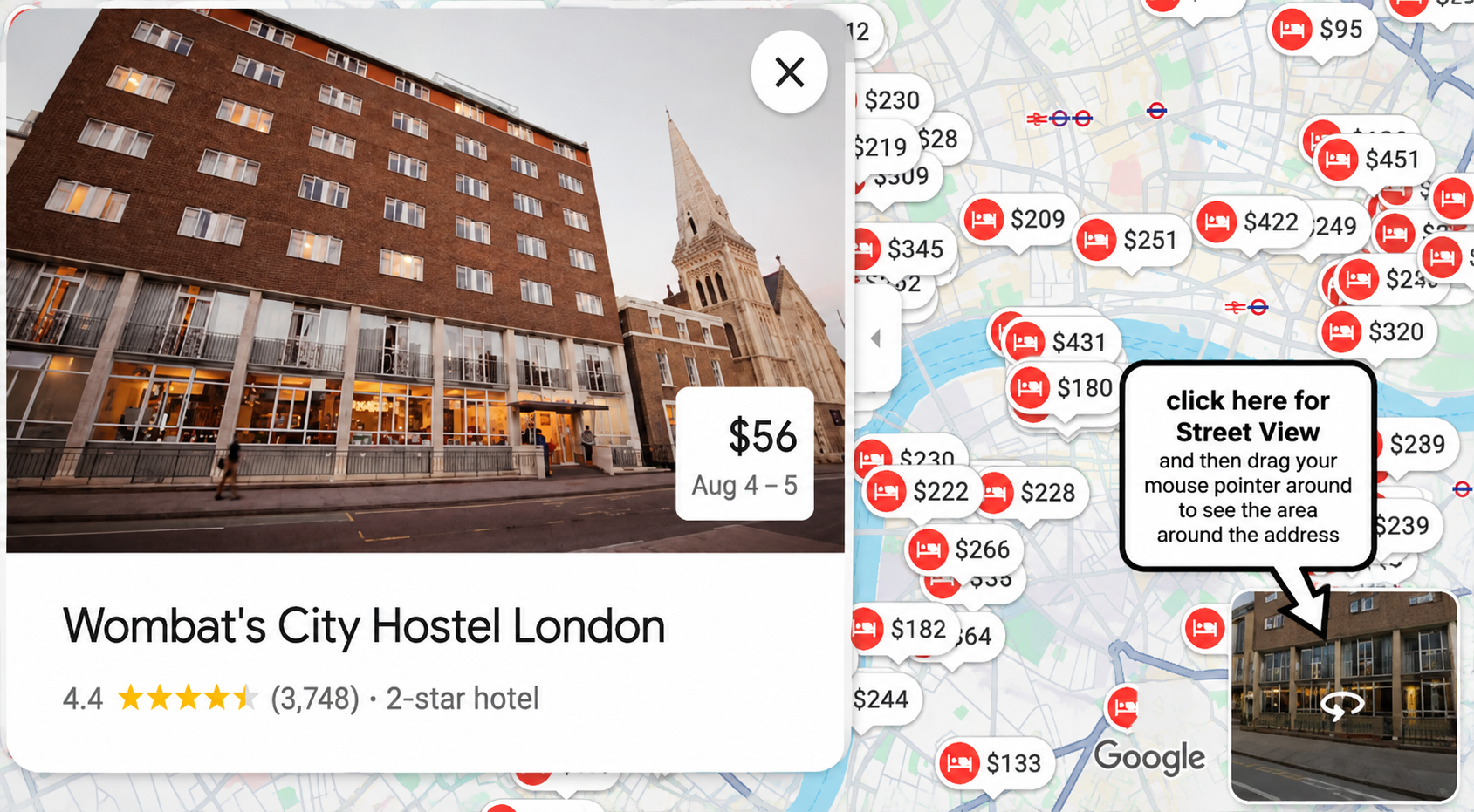
Before booking a hotel or rental, pull up the address in Google Maps and drop into Street View for a virtual walk around the block. A hotel's website may show a lovely photo of the entrance; Street View shows what's next door. You'll get a much better sense of whether you're in a busy commercial area or a quiet residential one, whether there are restaurants nearby, and whether that hotel described as "steps from downtown" is using a generous definition of "steps." Especially useful if you won't have a car.
Make your own travel map
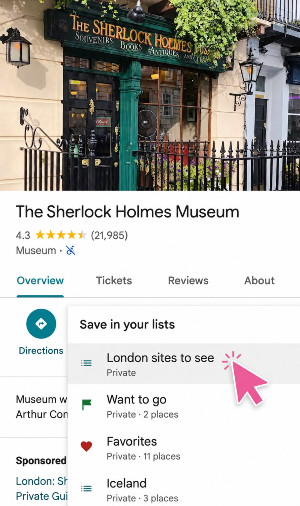
Here's another trick I love: save places before you leave. As you research, add restaurants, museums, shops and attractions to a Google Maps list, maybe one called "London Sites To See." When you arrive, instead of trying to remember that restaurant somebody recommended three months ago, you'll see all your saved places, and see them geographically. Just finished a museum and you're hungry? Open the map and discover a saved restaurant two blocks away. It's a simple way to let geography help build your itinerary instead of crisscrossing the city.
Before you leave, download a few things
Some of the most useful travel technology is useless without a signal. Before leaving home, download an offline map of your destination in Google Maps, and if you're headed somewhere the language is unfamiliar, download it in Google Translate too. You can translate signs and menus with your camera, often without internet. I also screenshot anything I absolutely need: boarding passes, hotel addresses, reservation confirmations. There is nothing I want trapped inside an app when the airport Wi-Fi decides not to cooperate.
Put your important information in one place
Before a trip, create one location (email, iPhone/iPad's Notes, or even text messages to yourself) for the trip. Put your flight, hotel and rental confirmations, tickets and other documents there, plus the boring stuff: a scan of your passport, travel insurance info, emergency contacts. Not because you expect something to go wrong, but because searching 14,000 emails for "Your Reservation Is Confirmed!" at the airport is no way to begin a vacation. And although this column is all about tech, a few low-tech print outs of essential information are understandably a comfort in one's pocket.
Technology won't eliminate delayed flights, bad weather or the person in front of you at security who apparently didn't know liquids were an issue. But used well, it makes planning considerably easier. Use technology to search, compare, organize, translate and remind you. Then put the phone away occasionally and enjoy the trip!







)